Opsarionexor
Pulse Pack
Pulse Pack
Couldn't load pickup availability
- ⬇️ Digital file available after purchase
- 🗂️ Long-term availability
- 🔒 Secure checkout
- 🗓️ Content updated in 2026
Self-paced learning overview
Share
Problem Statement
Learners who understand basic system administration concepts often reach a point where individual commands are familiar, but complete administrative workflows still feel disconnected. Managing users, monitoring processes, reviewing services, organizing storage, and checking network activity may each seem understandable on their own, yet combining them into a reliable routine can be more difficult.
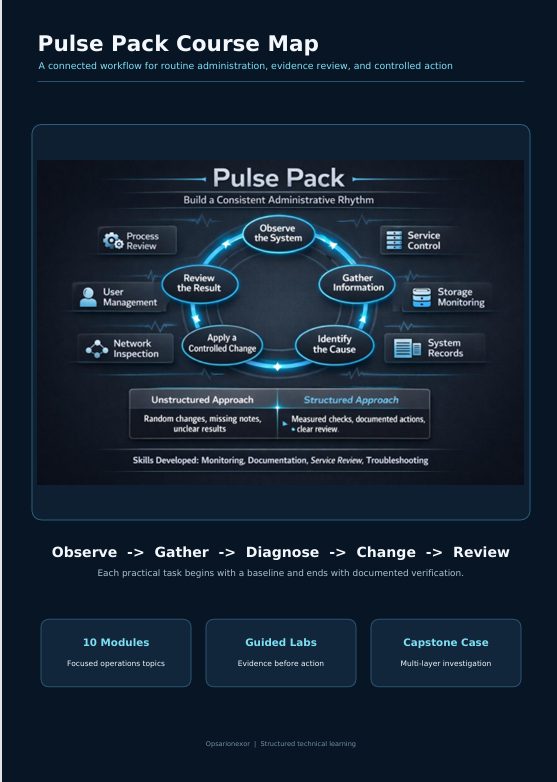
The Pulse Pack focuses on building a more consistent administrative rhythm. It helps learners move beyond isolated commands and begin working through structured observation, diagnosis, documentation, and review.
Solution
The Opsarionexor Pulse Pack introduces repeatable workflows for routine system administration. Each module connects technical concepts with practical administrative situations, helping learners understand how to evaluate system activity before making changes.
Rather than presenting troubleshooting as a collection of random commands, the Pulse Pack introduces a sequence: observe the issue, gather information, identify likely causes, make a controlled adjustment, and review the result.
What’s Inside
The Pulse Pack contains structured modules on process management, service control, user administration, permission review, storage monitoring, network inspection, scheduled tasks, and system records.
The materials include guided command exercises, administrative checklists, troubleshooting scenarios, review questions, configuration notes, and practice tasks. Learners also receive sample documentation formats for recording system changes, observations, and follow-up actions.
Each section builds on the Free Kit while introducing more detailed tasks and stronger administrative routines.
Who Is This For?
This course is intended for learners who have completed an introductory system administration course or already understand basic command-line navigation, files, directories, users, permissions, and processes.
It is suitable for junior administrators, technical support staff, developers working with infrastructure, laboratory learners, and anyone who wants to develop a more organized approach to routine system maintenance.
What You’ll Learn
- Review active processes and identify unusual resource usage
- Start, stop, restart, and inspect system services
- Create, modify, and review user and group settings
- Examine file ownership and permission structures
- Monitor storage usage and mounted locations
- Review basic network connections and listening services
- Understand scheduled administrative tasks
- Locate relevant system records during troubleshooting
- Document system changes and observations
- Build a repeatable troubleshooting sequence
- Compare expected behaviour with reported issues
- Verify system conditions after making adjustments
30-Day Refund Information
A refund request may be submitted within 30 days of purchase, subject to the terms published by the store.
The course description outlines the included modules, materials, and learning scope so learners can review the content before purchasing. Questions about course structure or suitability may be sent to the Opsarionexor team before enrollment.
Certification
The course include a certificate of completion, giving learners a clear way to confirm their progress and showcase their achievement.
Do I need previous system administration experience?
Do I need previous system administration experience?
The course collection begins with foundational concepts and gradually introduces more detailed administrative work. Earlier tiers are suitable for learners building their technical base, while later tiers explore broader infrastructure planning, troubleshooting, automation, and system maintenance.
How are the courses structured?
How are the courses structured?
Each tier is divided into focused modules containing explanations, practical examples, guided tasks, review points, and applied scenarios. The tier sequence is arranged so that each course builds on topics introduced earlier.
Are the materials suitable for self-paced learning?
Are the materials suitable for self-paced learning?
Yes. The lessons are organized for independent study. Learners can review modules in order, repeat practical tasks, and return to reference sections whenever they need additional clarification.